Table of Contents
Network security is one of those things that is easy to ignore until something goes wrong.
Most businesses now rely on a huge mix of cloud platforms, laptops, phones, remote logins, apps, and third-party tools just to get through a normal working day. That is great for flexibility, but it also means there are a lot more ways for security issues to creep in.
A good network security strategy is really about getting the basics right, knowing what is happening across your systems, and making life as difficult as possible for anyone trying to get in who should not be there.
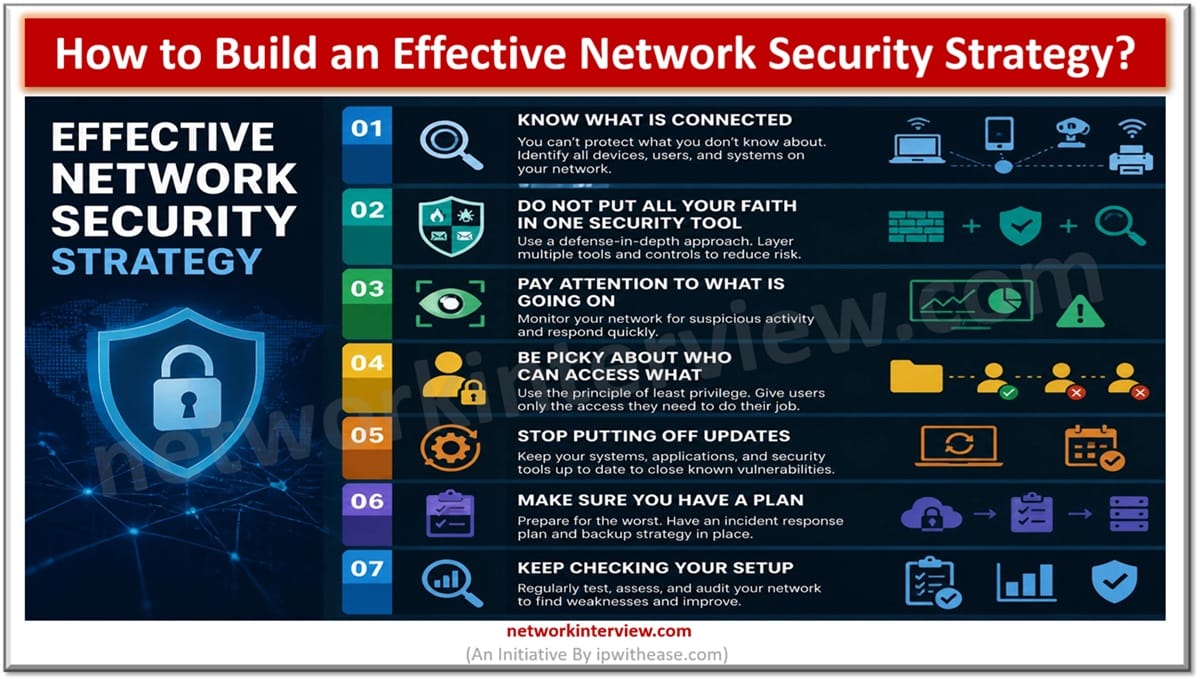
Effective Network Security Strategy
Know What Is Connected
It sounds obvious, but you cannot protect your network properly if you do not know what is on it.
Over time, businesses tend to collect all sorts of devices, accounts, software, and tools. Some are used constantly. Others were set up months or years ago and have barely been looked at since.
Those forgotten bits and pieces can be a problem.
An old laptop, an unused login, or a piece of outdated software could end up being the weak link in your security. Keeping track of what is connected to your network gives you a much better chance of spotting those gaps before someone else does.
It does not need to be overly complicated either. Start with a clear list of your devices, systems, software, and third-party connections, then make sure it stays up to date.
Do Not Put All Your Faith in One Security Tool
There is no single piece of software that can protect a business from every cyber threat.
Good network security is about having different layers in place. Firewalls, endpoint protection, email filters, access controls, and network monitoring all do different jobs, and they work best when they support each other.
Think of it like locking up a building. You would not rely on one flimsy lock and call it a day. You would probably have locked doors, alarms, cameras, and limits on who can access certain areas.
The same idea applies to your network.
It is also worth looking at network segmentation. This basically means separating different parts of your network so that if someone gets into one area, they cannot immediately wander through everything else.
The harder you make it for a threat to spread, the better.
Pay Attention to What Is Going On
A lot can happen across a business network in a single day.
People log in, files are accessed, devices connect, systems send alerts, and cloud platforms record activity. Buried somewhere in all of that noise could be something that does not look quite right.
That is why visibility matters.
Using SIEM tools can make it easier to bring security information together and spot patterns that might otherwise be missed.
Maybe someone is trying to log in repeatedly from an unusual location. Maybe a device suddenly starts behaving differently. Maybe there is a spike in activity at a strange time.
Catching these signs early can stop a small issue from turning into a much bigger headache.
Be Picky About Who Can Access What
One of the easiest ways to tighten up network security is to stop giving people access to things they do not need.
Someone working in marketing probably does not need access to the same systems as someone in finance. A temporary contractor may only need access for a few weeks. An employee who leaves the company should not still have an active account months later.
It sounds basic, but these things happen.
Try to keep access limited to what people actually need to do their jobs. Multi-factor authentication is also worth using wherever possible, as it gives accounts an extra layer of protection if a password is stolen.
It is also a good idea to check permissions regularly rather than assuming they are still correct.
Stop Putting Off Updates
Everyone has seen the update notification and clicked “remind me later.”
Once or twice, fair enough. Constantly delaying updates can cause real problems for a business.
Software updates often fix security weaknesses, so using old versions can leave known gaps open for attackers to target.
Make sure your systems, apps, network equipment, and security tools are being updated on a regular basis. It is also worth checking whether you are still using any old software that is no longer supported.
At some point, keeping ancient systems alive becomes more trouble than it is worth.
Make Sure You Have a Plan
No network security strategy is completely bulletproof.
Even businesses that take security seriously can still run into problems, so it pays to know what you are going to do if something happens.
Who needs to be told? Who takes the lead? How will you isolate affected systems? How will you get things back up and running?
Those decisions are much easier to make before an incident rather than in the middle of one.
Backups also matter here. Keep important data backed up, make sure those backups are secure, and test them occasionally. Finding out your backup does not work after you have already lost data is about as bad as it sounds.
Keep Checking Your Setup
The biggest mistake businesses can make is treating network security as a one-and-done job.
Things change all the time. New employees join. Old employees leave. Different software gets introduced. New devices connect to the network. Cyber threats change too.
That means your security setup needs the occasional health check.
Review who has access, look for old accounts, check for vulnerabilities, update your policies, and make sure employees know what common security threats look like.
You do not need to make network security unnecessarily complicated. A lot of it comes down to staying on top of the small things.
Know what is connected. Keep systems updated. Limit access. Watch for unusual activity. Have a plan for when things go wrong.
Do those things consistently, and you are already in a much stronger position.