Introduction to Pylint: Python Programming
Pylint is defined as a Python static code tool for analysis purposes. Pylint has the ability to scan for programming errors, implement coding standards, identify code violation and provide refactoring proposals.
Pylint is fully customizable by the user, with integral special functions to control individual errors and alerts within the user’s code. Pylint can also be executed from an extensive configuration file and gives to the user the ability to write his custom plugins.
Pylint is in general a free software, complying under the GNU General Public License terms.
Pylint: Specifications and Features
According to the official manufacturer’s website, Pylink tool has the following sophisticated features described below:
- Coding Standard: Pylint is a preferred tool due to the special abilities it provides such as checking the length of the line code. It also provides the ability to check according to the user’s coding standards, if the variable names are well formed. Finally, Pylint can check if the user is using imported modules.
- Error Detection: Pylint’s other great feature is the internal mechanism for error detection. To be more specific, it can check if the declared interfaces are implemented with true syntax and if there are any imported modules.
- Refactoring: As other tools, Pylint has also the ability to detect duplicated code. This process includes code refactoring, by restructuring existing code, without modifying the external behavior. Refactoring improves the design, the main structure and the implementation of the software.
- Fully Customizable: with Pylint , the user has the option to modify “pylintrc “, in order to customize which errors and conventions are important according his personal priorities and preferences. Pylint has also the great advantage of being configurable, customizable with the ability to write custom plugins for personal implementations.
- Editor Integration: It can be used with many code editors in the market. Most of the supported editions are emacs , vim (pylint.vlm, syntastic), eclipse, etc.
- IDE Integration: Another great advantage of this software tool is the ability to support various IDE’s. The main list of support is: Spyder, Editra, TextMate, Eclipse with PyDev, etc.
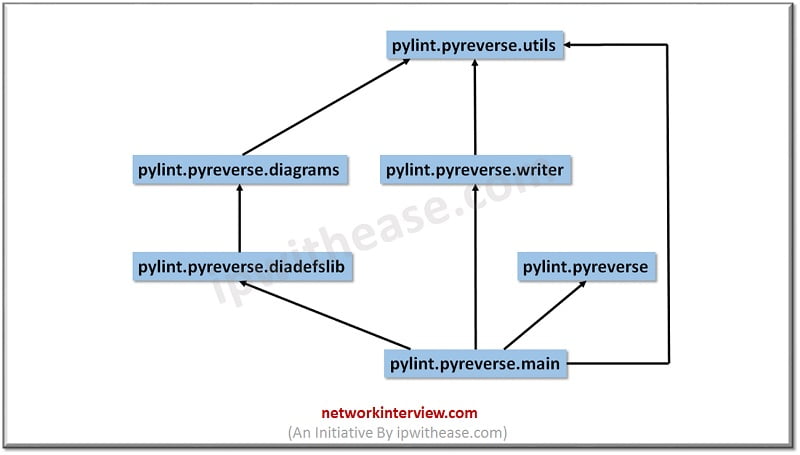
- UML Diagrams: Another great feature of Pylint is the extra content called Pyreverse which creates UML diagrams for python code. It is usually shipped with Pylint.
- Continuous Integration: Pylint allows the user to run it in his project code. This process can be automated using Apycot, Hudson or Jenkins.
- Extensibility: In scenarios where many users are facing the problem, where the underlying Astroid library doesn’t understand the code, this can be solved by contributing a patch to pylint-brain.
How to use Pylint
There are many platforms and operating systems supported by Pylink. Each of them has an identical way of installing the software. The most essential are described below:
Debian
sudo apt-get install pylint
Ubuntu
sudo apt-get install pylint
Fedora
sudo dnf install pylint
Gentoo
emerge pylint
openSUSE
sudo zypper install pylint # python2.7
sudo zypper install python3-pylint
FreeBSD
portmaster devel/pylint
Arch Linux
pacman -S python2-pylint # old version
pacman -S python-pylint # new version
Mac OS X
pip install pylint
Windows
pip install pylint
From source using GIT
git clone https://github.com/PyCQA/pylint
git clone https://github.com/PyCQA/astroid
Conclusion
To summarize the overall article, we can define Pylink as a tool that checks for errors in Python code, enforces coding standards and looks for smells in the code. Furthermore, It can also scan for certain type errors, recommend suggestions about how specific blocks can be refactored and at the end offers to the user specific information about the code’s complexity.
Pylint is designed to display a number of messages while it analyzes the code and it can also be used for viewing crucial statistics about the number of warnings and errors identified in different files. These kind of messages are classified by the tool, under various categories including errors and warnings.
Notably, there is quite a likelihood that in future we hope to see other open free software such as Pylink, which will be not limited to programmers due to its complex interface.
Continue Reading:
Observium – Network Management & Monitoring