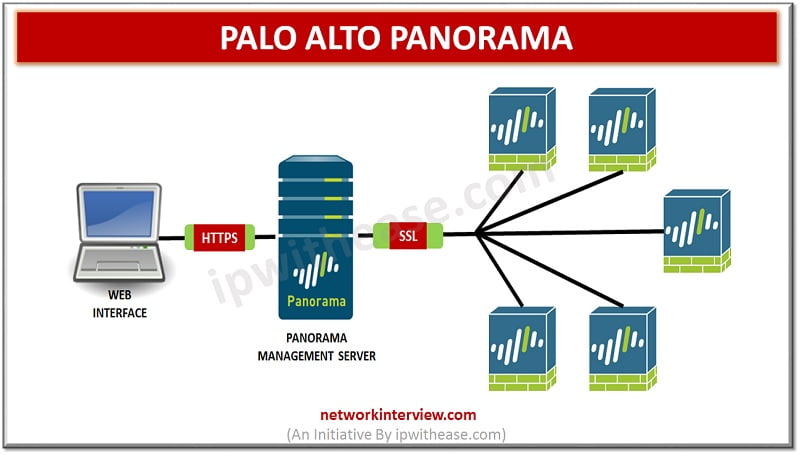
Centralized management of firewalls is a common requirement for all IT network administrators. The centralized management enables management of firewalls having diverse hardware, scaling capabilities, performance parameters such as log throughput, concurrent sessions, interfaces and capability management.
Palo Alto Panorama virtual appliances offer flexibility and scalability. The M-series hardware is ideal for small deployments scaling requirements. While higher series in this range (M-500/600/700) support larger enterprises with supporting management of large number of devices, having higher throughput, and advanced features such as distributed log management in large and complex environments. Higher versions support more core count, higher interface speeds (1G/10/40/100), capacity of logs and overall firewall number count.
In today’s article we will understand the difference between Palo Alto – Panorama models, their key differences, how they are used and what is in store for the future.
What is Panorama
Panorama enables effective management of firewalls configuration and monitoring with centralized management. The Panorama major capabilities are:
- Centralized deployment and configuration – simplified central management and rapid deployment of firewall devices and Wildfire appliances. Templates can be created to implement device configuration via groups that can be used to manage local and shared policy rules.
- Central oversight with aggregated logs for analysis and reporting – all managed firewalls activities logs are recorded, aggregated and investigated to report issues. Network traffic, user activities comprehensive review enables better response for potential threats supported by robust security policies to enable applications securely on the network.
- Administration is distributed – deletion and restricting access to firewall administration to specific groups using role based access control.
Palo Alto – Panorama Models Comparison
Panorama Models Comparison | ||||||
| Features | Panorama virtual appliance | M-600 | M-500 | M-200 | M-300 | M-700 |
| Platforms supported | Installed on Alibaba cloud, AWS, AWS Govcloud, Microsoft Azure, Google GCP, KVM, Hyper-V, Oracle OCI, ESXi server, VMware vCloud Air. | Dedicated hardware appliance | Dedicated hardware appliance | Dedicated hardware appliance | Dedicated hardware appliance | Dedicated hardware appliance |
| Throughput | Depends of assigned virtual resources (RAM/CPU) | 10 Gbps throughput supported | 10 Gbps throughput supported | 1 Gbps throughput supported | 1 Gbps throughput supported | 1 Gbps throughput supported |
| Log capacity | Collects firewall logs locally – 20,000 logs per second | Collects firewall logs over 10,000 logs per second | Collects firewall logs over 10,000 logs per second | Collects firewall logs over 10,000 logs per second | Collects firewall logs over 10,000 logs per second | Collects firewall logs over 10,000 logs per second |
| Firewall management | Can manage up to 2500 firewalls | Can managed up to 5000 firewalls | Can managed up to 5000 firewalls | |||
| Interfaces | Any interface supported | MGT, Eth1, Eth2, Eth3 | MGT, Eth1, Eth2, Eth3 | MGT, Eth1, Eth2, Eth3 | MGT, Eth1, Eth2, Eth3 | MGT, Eth1, Eth2, Eth3 |
| Features | Dedicated log collectors supported for higher logging rate | RAID driver for firewall logs storage and RAID 1 mirroring | RAID driver for firewall logs storage and RAID 1 mirroring | RAID driver for firewall logs storage and RAID 1 mirroring | RAID driver for firewall logs storage and RAID 1 mirroring | RAID driver for firewall logs storage and RAID 1 mirroring |
| Log storage SSD based | Log storage SSD based | Log storage SSD based | Log storage SSD based | Log storage SSD based | ||
| Hot swappable power supplies | Hot swappable power supplies | Hot swappable power supplies | Hot swappable power supplies | Hot swappable power supplies | ||
| Template based reusable configurations | Template based reusable configurations | Template based reusable configurations | Template based reusable configurations | Template based reusable configurations | ||
| Zero touch provisioning
| Zero touch provisioning
| Zero touch provisioning
| Zero touch provisioning
| Zero touch provisioning
| ||
| Use cases | Ideal for cloud or mixed deployed | Large setups, data centers, service providers, complex multi-region deployments | Large setups, data centers, service providers, complex multi-region deployments | Ideal for branch offices, mid-size | Ideal for branch offices, mid-size | Large setups, data centers, service providers, complex multi-region deployments |
Download the comparison table: Panorama Models Comparison Table
Continue Reading
FortiAnalyzer vs Panorama: Detailed Comparison
Fortigate: FortiManager Models Comparison