Table of Contents
SD-WAN or software defined networking have SD-WAN rules also known as services rules. They are used for identification of traffic of interest and routing of traffic based on route condition and strategy between two devices in a network. SD-WAN rules control distribution of SD-WAN members sessions. These rules can be configured using CLI or GUI interface as desired.
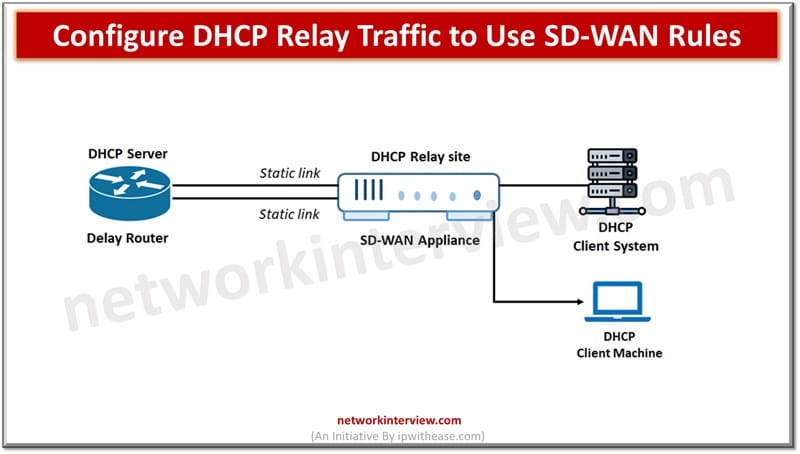
In today’s topic we will learn about how to configure DHCP relay traffic to make use of SD-WAN rules.
SD-WAN Rules
SD-WAN rules can be created using CLI or GUI interface. For GUI users Goto Network🡪 SD-WAN 🡪SD-WAN rules.
From CLI
config system sdwan
config service
edit <ID>
next
end
end
DHCP relay is a host or a router to forward DHCP packets between servers and clients. DHCP is used as a service in SD-WAN appliances to relay requests and replies between local DHCP clients and remote DHCP servers. Local hosts can acquire dynamic IP addresses from remote server.
By default, when DHCP relay is configured on an interface, FortiGate does packet forwarding based on routing table lookups irrespective of the configured SD-WAN rules.
Sample Configuration
Sample configuration of DHCP relay configuration on an interface
# config system interface
edit “vlan-10”
set vdom “root”
set dhcp-relay-service enable
set ip 10.9.62.254 255.255.255.0
set allowaccess ping
set device-identification enable
set dhcp-relay-interface-select-method auto
set dhcp-relay-ip “192.12.10.1” “192.12.10.2 “
set interface “port1”
set vlanid 20
next
As default behaviour, on reaching relayed traffic to FortiGate it is considered locally originated and does not match any SD-WAN rule.
The setting ‘set dhcp-relay-interface-select-method auto’ means all traffic will use the best available interface
Options to Route Traffic for DHCP Relay
There are three options available to route the traffic for DHCP relay as under:
- Auto- Establish outgoing interface automatically (Which is default setting)
- SD-WAN – configure interface by SD-WAN or routing policy rules
- Specify – configure interface manually
To configure interface to use SD-WAN rules the below setting needs to set as
set dhcp-relay-interface-select-method sdwan