Majority of organizations are moving to cloud based infrastructure to run their IT operations. Cloud service providers require to provide multi-tenancy services and require to have products which support multi-tenant scenarios. Networking is one of the crucial aspects of the cloud ecosystem which enables administrators to constrain access privileges to a subset of server load balancing virtual servers. Fortinet, a major player in the space, had introduced a new virtual domain mode to support administrative domain (ADOM) functionality. ADOMs can share the same networking interfaces and perform routing between all ADOMs.
Today we look more in detail about comparison between Fortinet Administrative domains (ADOM) and Virtual Domain (VDOM), how they work, and how to configure ADOM/VDOM.
What is VDOM or Virtual Domain in Fortinet?
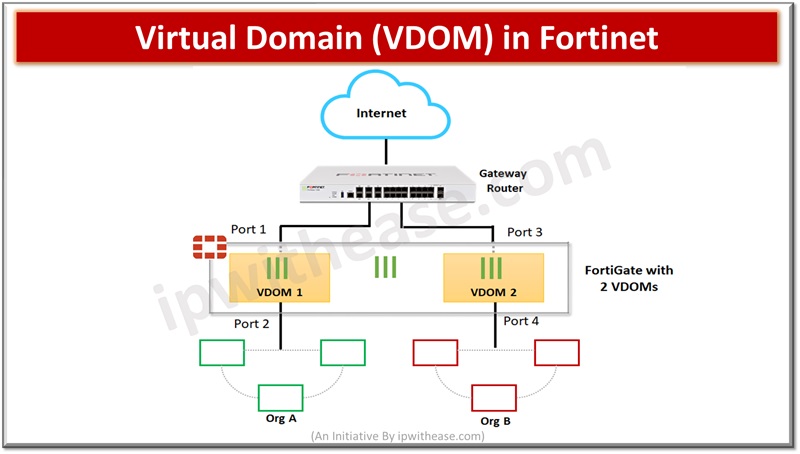
Virtual domains (VDOM) allow to divide a single physical Fortigate unit into multiple virtual devices, functioning as independent firewall having its own interfaces, configuration, and policies. This capability is useful in multi-tenant environments where logical segregation is required in network infrastructure.
Each VDOM operates as a separate firewall allowing network administrators to create separate security policies and configurations for different network segments, physical resources are shared, segmentation of network improves security, VDOMs can also be used for traffic segmentation. By default, Fortinet operates in default VDOM called root and manages all other VDOMs global configurations.
Related: FortiGate VDOM Configuration: Complete Guide
Configuring VDOM
To enable VDOM
Go to System > Settings > Under Operations Settings, enable Virtual Domains
From CLI use below command
config system global
set vdom-mode multi-vdom
end
To create ADOM
Login to admin account
Go to Global > System > VDOM. Create two VDOMS, VDOM-1 and VDOM-2.
What is ADOM or Administrative Domain in Fortinet?
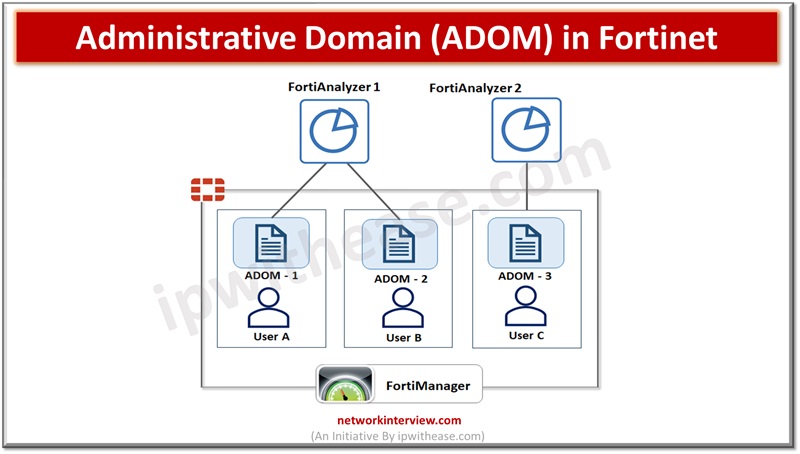
Administrative domains (ADOM) enable administrators to constraint other administrators access privileges to a subset of policies and host names (protected). This is useful in large enterprises having multi-tenant deployments like web hosting companies. The ADOM is not enabled by default. Enabling and configuring ADOM is performed by the administrator.
When ADOM is enabled, functions available in GUI and CLI are altered. ADOM enabled interface will have additional options such as access to config global, can create administrator accounts and create and enter all ADOMs. Config global mode contains settings used by FortiWeb and for ADOMs. If ADOMs are enabled you can login as administrator of your ADOM and access only the logs, reports, policies, servers, and LDAP queries specific to your ADOM.
By default, an administrator account apart from ‘admin’ is assigned the root ADOM having all policies and servers. With ADOMs having a subset of policies, servers, assignment of administrator accounts we can restrict other administrator accounts to a subset of FortiWeb overall protected servers.
Configuring ADOM
To enable ADOM
Go to System > Status > Status, in the System Information widget, in the Administrative Domains row, click Enable
From CLI use below command
config system global
set adom-status {enable | disable}
end
To create ADOM
Login to admin account
Go to Global > System > Administrative Domain > Administrative Domain.
Click Create New, enter the Name, then click OK.
You can one of the following
- Assign another administrator account to configure ADOM
- Configure the ADOM
VDOM vs ADOM: Difference
Definition
- VDOM – Logical segmentation of a physical FortiGate device into multiple independent firewalls, each with its own configuration and policies
- ADOM – Logical grouping of multiple FortiGate devices managed by a single FortiManager instance, each with its own configuration and policies.
Scope
- VDOM – Implemented within a single FortiGate device.
- ADOM – Implemented within a FortiManager management system managing multiple FortiGate devices.
Purpose
- VDOM – Divides Fortigate into two or more virtual units which function independently. VDOMs provide separate security policies, in NAT mode, separate configurations for VPN and routing services for connected networks.
- ADOM – ADOM functionality enables administrators to constrain access privileges to a subset of server load balancing virtual machines.
Isolation
- VDOM – Provides isolation between different virtual networks on the same physical device.
- ADOM – Provides isolation between different FortiGate devices managed within the same FortiManager instance.
Functioning
- VDOM – VDOMs are managed via ADOMs
- ADOM – Multiple VDOMs could be managed under one ADOM.
Management
- VDOM – Managed locally on the FortiGate device through its GUI, CLI, or API.
- ADOM – Managed centrally through FortiManager, offering a single interface for managing multiple FortiGate devices.
Support
- VDOM – Fortigate unit support by default 10 VDOMs and some models support purchase of a license key to increase the maximum number
- ADOM – Maximum number of ADOMs support depends on FortiAnalyzer model.
Use Cases
- VDOM – Suitable for organizations needing to segregate network traffic within a single FortiGate device, such as service providers or large enterprises with multiple departments.
- ADOM – Suitable for Managed Service Providers (MSPs) or enterprises managing multiple FortiGate devices across distributed locations, allowing centralized management and control.
Scalability
- VDOM – Limited to the capacity and resources of the physical FortiGate device.
- ADOM – Scales with the capacity and resources of the FortiManager system, allowing management of a larger number of FortiGate devices.
Resource Usage
- VDOM – Each vDOM consumes resources (CPU, memory) from the physical device, potentially impacting performance.
- ADOM – ADOMs on FortiManager consume resources, but individual FortiGate devices within ADOMs do not share resources, ensuring optimal performance for each device.
Deployment Flexibility
- VDOM – Can be deployed standalone without requiring a FortiManager instance.
- ADOM – Requires FortiManager for centralized management, making it more suitable for distributed deployments or managed service environments.
VDOM vs ADOM: Comparison Table
Please find below a downloadable summarized table for better understanding:
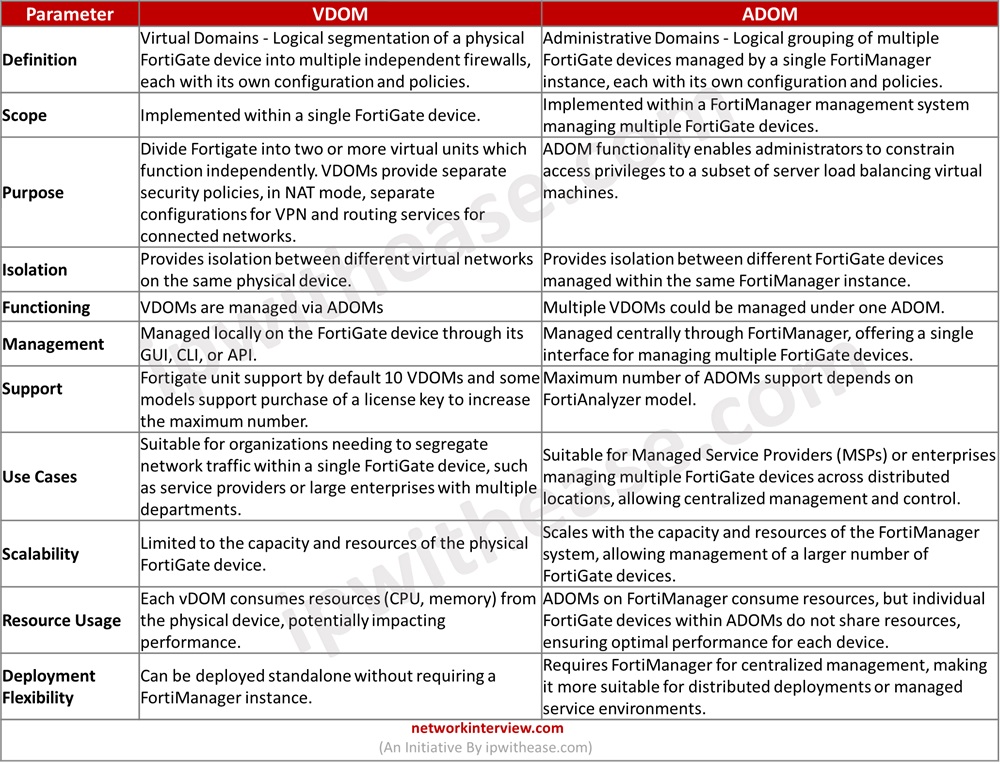
Download the comparison table: VDOM vs ADOM
Continue Reading:
Fortinet FortiGate HA (High Availability): Detailed Guide
FortiGate NAT Policy: Types & Configuration