
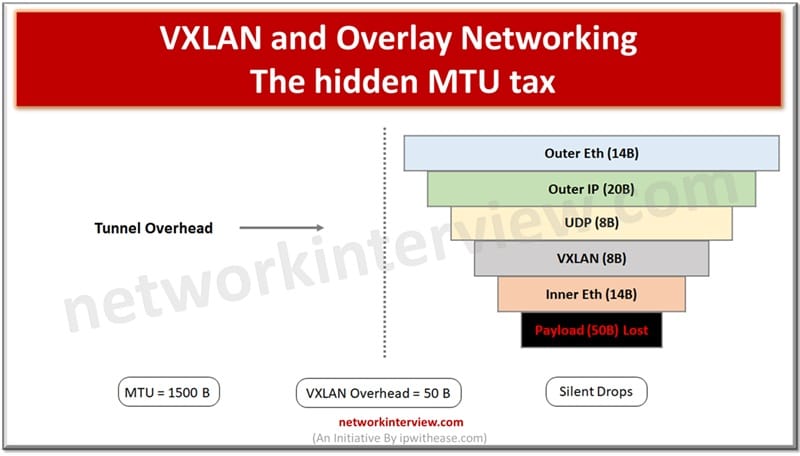
VXLAN and Overlay Networking: The hidden MTU tax
Every network engineer learns about MTU the hard way — a packet too large, a silent drop, and hours of debugging later, you find the culprit. With VXLAN and overlay networking, that tax gets worse: every tunnel you add quietly steals bytes from your payload, and most teams don’t notice until production is already on fire.
Modern data centers increasingly rely on overlay networks — virtual Layer 2 fabrics stretched over a physical IP underlay. VXLAN (Virtual eXtensible LAN, RFC 7348) is the dominant standard, used by VMware NSX, Cisco ACI, Open vSwitch, and virtually every major cloud provider’s tenant networking stack. Understanding how VXLAN interacts with jumbo frames is essential — and where most engineers get caught out.
How VXLAN encapsulation works
VXLAN wraps an entire inner Ethernet frame inside a UDP packet, which is itself carried inside an outer IP/Ethernet frame. This encapsulation adds a fixed overhead of 50 bytes to every packet:
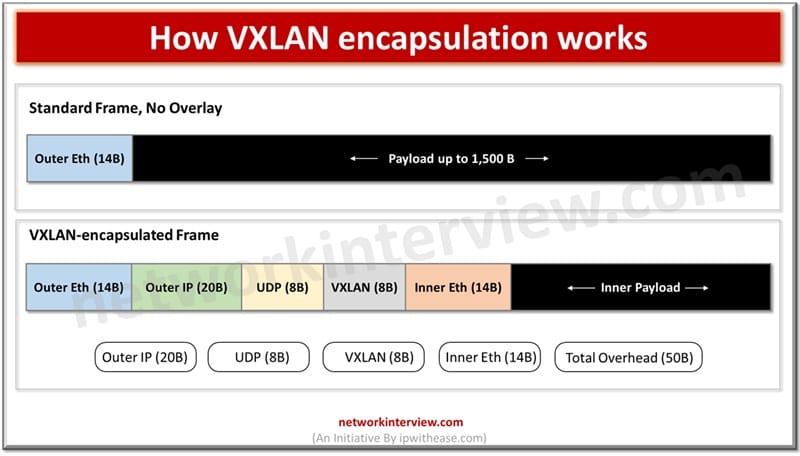
The MTU Crunch: 1,500 − 50 = 1,450
Here is the problem. When a VM or container sends a packet, it typically assumes an MTU of 1,500 bytes — the standard. But by the time that packet is VXLAN-encapsulated and placed into an outer frame, the total size of the outer frame is 1,550 bytes (1,500 inner + 50 VXLAN overhead). That exceeds the physical network’s MTU.
The result is one of two outcomes: the underlay fragments the oversized outer packet (hurting performance), or — if the Don’t Fragment (DF) bit is set, which it almost always is — it drops the packet and sends an ICMP “fragmentation needed” message back. If ICMP is filtered (a very common misconfiguration), the sender never learns about the problem and the connection silently stalls. This is a classic case of PMTUD blackholing.
Scenario | Underlay MTU | Effective tenant MTU | Status |
| No overlay, standard | 1,500 B | 1,500 B | Works |
| VXLAN, standard underlay | 1,500 B | 1,450 B | Needs config |
| VXLAN, standard underlay, misconfigured | 1,500 B | 1,500 B (claimed) | Silent drops |
| VXLAN, jumbo underlay (9,000 B) | 9,000 B | 8,950 B | Optimal |
| VXLAN, jumbo underlay, tenant MTU 1,500 B | 9,000 B | 1,500 B | Works cleanly |
The Recommended Architecture: Jumbo Underlay, Standard Tenant
The industry-standard solution is elegant: configure the physical underlay for jumbo frames (MTU 9,000) while leaving the tenant-facing interfaces at 1,500 bytes. This gives you the best of both worlds:
Best practice
Set the physical NIC and all switch ports to MTU 9,000. Set VTEP (VXLAN Tunnel Endpoint) interfaces to MTU 9,000. Leave VM / container interfaces at MTU 1,500. The 50-byte VXLAN overhead is absorbed invisibly within the jumbo frame headroom, and tenants see a clean standard MTU with no surprises.
This is precisely the pattern used by hyperscale clouds. AWS, Azure, and GCP all run jumbo-capable underlay fabrics so their overlay encapsulations (VXLAN, Geneve, or proprietary equivalents) never cause tenant-visible MTU issues.
Geneve, GRE, and Other Overlay Protocols
VXLAN is not the only overlay in town. Geneve (RFC 8926) — used by Open vSwitch and increasingly preferred by cloud vendors — adds a variable-length header, meaning its overhead can exceed 50 bytes when options are present. GRE (Generic Routing Encapsulation) adds 24 bytes, and IPsec can add 50–80 bytes depending on the cipher suite. STT (Stateless Transport Tunnelling), used in some older NSX deployments, adds 54 bytes.
The principle is the same across all of them: every overlay byte eats into your effective MTU. Running a jumbo underlay gives you the headroom to stack multiple encapsulations — for example, VXLAN-over-IPsec — without fragmenting tenant traffic.
Practical VTEP Configuration
When configuring VTEP interfaces, always set their MTU to match the underlay (9,000 B if you have jumbo frames enabled). In Linux with Open vSwitch this means setting the MTU on the VXLAN interface explicitly — OVS does not automatically inherit the physical NIC MTU. In VMware NSX-T, the TEP (Tunnel Endpoint) profile controls this and should be set to 9,000.
Verify with:
ip link show vxlan0 — confirm mtu 9000 appears in the output.
Then test end-to-end with a large ICMP probe:
ping -M do -s 8900 <remote-vtep-ip> from the hypervisor host (not the VM) to confirm the underlay path is clean before worrying about tenant paths.
“The most common VXLAN MTU mistake: configuring the physical NIC for jumbo frames but forgetting the VXLAN interface itself. The VTEP sits between them, and if it’s still at 1,500, your jumbo underlay does nothing for overlay traffic.”

You may also like

The Best MCP SEO Tools for Automating Weekly SEO Reporting