Top 10 AI Coding Tools in 2026
AI coding tools changed shape over the last two years. The first wave suggested the next line of code inside an editor. The current wave can take a whole task, plan the steps, then edit files and run tests on its own. Developers now choose between assistants that speed up typing and agents that handle entire chunks of work while the developer reviews the result.
This list covers the ten tools that matter most in 2026, what each one does well, and how to pick between them.
Assistants vs. Agents: Know the Difference First
Two categories dominate the market:
- Coding assistants live inside the editor and suggest code as the developer types. They make an experienced developer faster at the work they were already doing.
- Coding agents accept a goal, such as “add pagination to this API,” work through it in steps, and present the finished changes for review. They can run for minutes or hours without input.
Most tools below now offer both modes. The difference lies in where each one started and what it still does best.
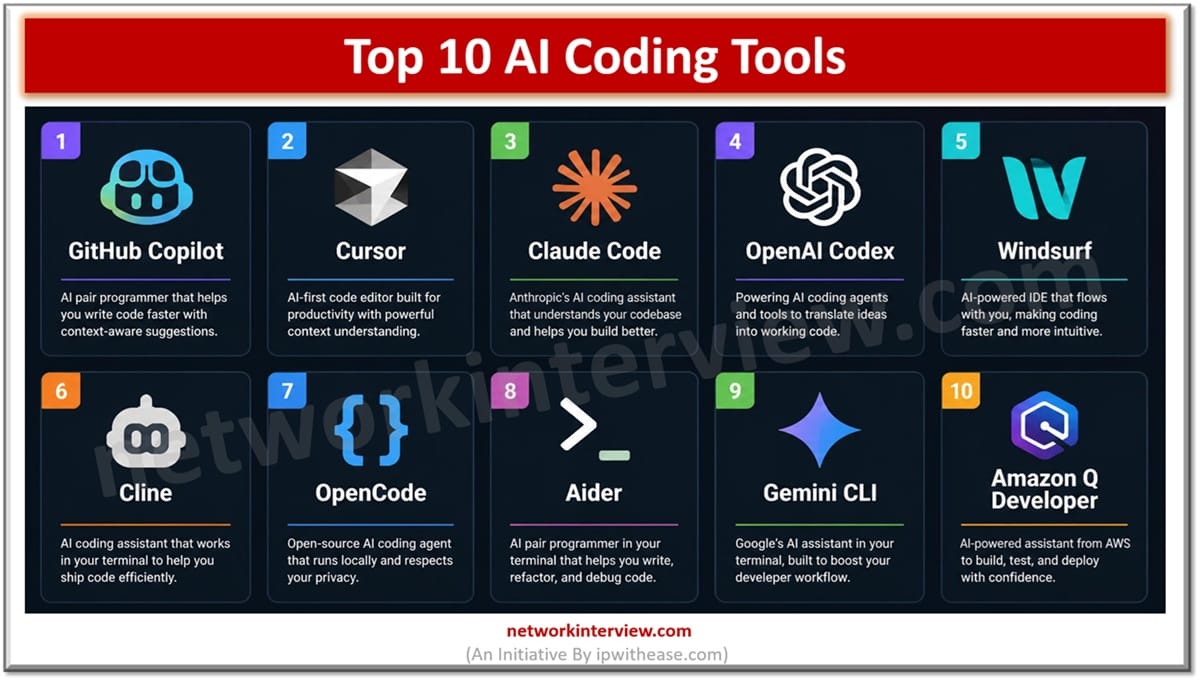
The Top 10 AI Coding Tools
1. GitHub Copilot
Still the default choice for most teams. Copilot runs inside VS Code, Visual Studio, and the JetBrains IDEs, and GitHub has added an agent mode that can pick up issues and open pull requests on its own. Enterprise plans include policy controls and IP indemnity, which matters to companies with strict compliance rules. If a team adopts only one tool, this is usually it.
2. Cursor
Cursor is a full editor, built as a fork of VS Code, with AI wired into every part of it. Its tab completion predicts multi-line edits, and its agent mode carries out changes across many files at once. Startups adopted it fast because it feels quicker than an extension bolted onto a standard editor.
3. Claude Code
Anthropic’s coding agent runs in the terminal and through IDE extensions. It reads a codebase, plans multi-step work, and completes long jobs like refactors and migrations with less hand-holding than most rivals. Teams that live in the command line tend to prefer it, and it has become the reference example of the agentic style of tool.
4. OpenAI Codex
Codex works as both a CLI and a cloud agent. A developer can hand it several tasks, let them run in parallel in separate sandboxes, then review the resulting pull requests. It suits teams that want to delegate background work rather than pair with a tool in real time.
5. Windsurf
Another AI-first editor, with an agent called Cascade that tracks what the developer is doing and offers to continue the work. Windsurf has a gentler learning curve than Cursor, so it comes up often as the recommendation for developers who want to try an AI editor for the first time.
6. Cline
Cline is an open-source agent that runs as a VS Code extension. Developers bring their own API key and pick whichever model they want, which keeps costs transparent and avoids lock-in to a single vendor. Every file edit and terminal command needs approval before it happens, so the developer always sees what the agent intends to do. Support for the Model Context Protocol (MCP) lets it connect to outside tools and data sources.
7. OpenCode
OpenCode brings the agent experience to the terminal without tying users to one AI provider. It is open source, supports dozens of model providers, and offers a clean terminal interface for planning and executing coding tasks. Teams that want a Claude Code-style workflow with the freedom to swap models underneath usually land here.
8. Aider
One of the earliest open-source terminal tools, and still one of the best for git-centered work. Aider maps a repository, makes edits through a chat session, and commits every change with a sensible message. Its light footprint and scriptability keep it popular with developers who automate parts of their own workflow.
9. Gemini CLI
Google’s open-source terminal agent, best known for a free tier with generous daily usage. That makes it the cheapest way to find out what a coding agent can actually do before spending anything. It also connects to the wider Gemini model family and Google Cloud services.
10. Amazon Q Developer
Amazon’s tool makes the most sense for teams already on AWS. Beyond code suggestions, it includes transformation features that upgrade legacy Java and port older .NET Framework applications to cross-platform .NET, jobs that used to consume months of manual effort. Deep AWS integration is the draw; teams outside AWS will find less here.
How to Pick the Right One
- One tool for a large team with compliance needs: GitHub Copilot
- Fastest editor experience: Cursor or Windsurf
- Long, complex tasks from the terminal: Claude Code or OpenAI Codex
- Open source and model freedom: Cline, OpenCode, or Aider
- Free to start: Gemini CLI
- All-in on AWS: Amazon Q Developer
What These Tools Mean for Enterprise Stacks Like .NET
The loudest demos happen in JavaScript and Python, but the biggest payoff often shows up in enterprise codebases. .NET is a good example. Agents such as Copilot, Claude Code, and Cline handle C# well, and the strong typing of the language gives them guardrails: bad generated code usually fails to compile before it can cause damage.
Common uses in custom .NET development include migrating .NET Framework services to modern .NET, generating unit tests for legacy code, and large refactors that would be too tedious to do by hand. Firms that build .NET software at scale, such as Full Scale, now train engineers on these agents as a standard part of the job, because a senior developer who directs an agent gets through review-ready work far faster than either could alone.
The same pattern holds for any mature stack: the tool produces the first draft, and an experienced engineer reviews it, corrects it, and owns the result.
Final Words
This list will look different again by 2027, because the market moves that fast. The durable skill is learning to direct these agents well. That means clear task descriptions, a critical eye on everything they produce, and the judgment to know which jobs are too important to hand off. Pick one assistant and one agent from the list above, run them on a real project for two weeks, and the right choice for the team will become obvious.