Table of Contents
Cyber Attack Technologies
Various forms of cyber attacks are prevailing these days and method of attack sophistication has reached new levels where now attackers are not limited only to fake websites, messages or emails but also focus is on theft of data from social media platforms and failure of security systems. Social engineering attacks are on rise which trick victims into disclosing confidential, personal or sensitive information and then use it for financial gains or to bother cybercrimes.
Today we look more in detail about two cyber attack techniques: phishing and spam, how these attacks are carried out, how to identify such attacks, steps that can be taken to avoid not being a victim of such attacks and so on.
What is Phishing?
Cybercriminal’s cheat and obtain confidential information in deceiving ways such as passwords, or information about credit cards or other banking details, which could lead to financial loss. Social engineering techniques such as obtaining necessary information by manipulating legitimate users is on the rise. Cybercriminal or attacker poses as a person or business of trust in an official communication usually via an email or instant message, social networks, or even using phone calls.
Related: Spear Phishing vs Phishing
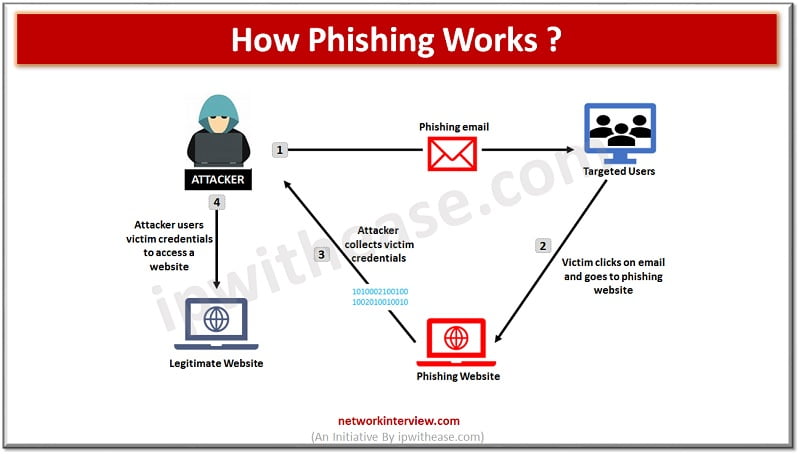
Such emails usually contain a malicious link which when clicked lead to false web pages letting users believe that they are at a trusted website and provide requested information which goes into spammer hand.
- The SMS based phishing attack which is also known as smishing is the one in which a user receives a text message to visit a malicious link or
- A vishing kind of phishing attack is the one where user receives a call from a bank or some other financial institution asking for verification of personal details which attacker could use to steal money.
What is Spam?
Spam is nothing but a flooding of mailboxes or systems with unwanted messages sent by unknown senders, which you have not requested or desired are sent in large numbers. The nature of most of the spam mail is to advertise a product or service. Spammers buy databases which include thousands of email addresses and often mask the origin of message or sender information with the intent to damage or choke systems.
Spams are also used by hackers to create problems for network administrators but flooding systems, taxed bandwidth, unwanted use of storage space etc.
How to protect from Phishing and Spam?
- Don’t click on unsolicited emails or links
- Don’t enter your personal sensitive information on unsecured sites if the site URL not starting with HTTPS and a padlock symbol don’t enter any sensitive information or download any files from such sites
- Rotate your passwords regularly and enablement of multi factor authentication is a good strategy to secure passwords
- Make sure your system has latest security patches and updates are installed
Comparison Table: Phishing vs Spam
Below table summarizes the differences between the two cyber attack technologies:
| Function | Phishing | Spam |
|---|---|---|
| Definition | Phishing attacks are designed to steal user private information such as passwords, bank account , credit card details etc | Spam is unsolicited email or junk having irrelevant content or commercial advertising contents |
| Purpose | Illicit way to obtain user credentials to use it to perform further financial fraud or cyber crime and trick people into clicking on malicious links and take control of their systems | Unsolicited email which tries to sell something but for nefarious purpose and making some money from recipients who actually respond to emails |
| Mode | Phishing is not just limited to emails it can happen via phone call, SMS , social media etc | Spam uses email to flood your mailbox |
| Technique | Utilize social engineering techniques such as pressure, trust, fear , urgency etc Planned and executed in a sophisticated manner and carefully designed to lure the victim into sharing or revealing their personal information such as login or password so attacker can gain control of victim details such as bank information, emails and more | Uses commercial content such as dicey legal services, quick money-making schemes , illegal offers It hides the true content of emails to make victim spend their money on products that actually don’t exist or counterfeit goods |
| Examples | • Request for personal information • Direct user to open a link or attachment • Verification of account / password • Convey sense of urgency | •Advertising (retailers, dating websites, online pharmacies, gambling etc) • Get rich quick schemes • Hoax virus warning messages • Chain emails |
Download the comparison table here: Phishing vs Spam
Continue Reading
What is Spoofing? Detailed Explanation