

What are Jumbo Frames? Jumbo Frames and MTU
Jumbo frames are Ethernet frames with a payload larger than the standard 1500-byte MTU, typically up to 9000 bytes. They reduce overhead and improve throughput for large data transfers by allowing more data per frame, but require all network devices in the path to support them.
“How oversized network packets can dramatically improve throughput and when you should actually use them.”
Every time data travels across a network, it is broken into discrete chunks called frames. By default, Ethernet has carried a maximum frame size of 1500 bytes since its standardization in the 1980s — a figure chosen when networks were orders of magnitude slower than today. A jumbo frame shatters that convention, allowing a single Ethernet frame to carry up to 9000 bytes of payload.
Standard Ethernet MTU | Jumbo Frame MTU |
1,500 bytes per frame | 9,000 bytes per frame |
| The default since IEEE 802.3 standardization. Works across virtually all hardware and networks. | Six times larger. Reduces overhead dramatically for high-volume, controlled environments. |
Why Frame Size matters?
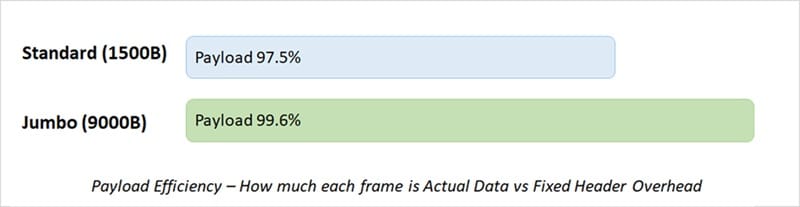
Each Ethernet frame carries not only the data you care about — called the payload — but also a header containing source and destination MAC addresses, type information, and a checksum. This overhead is fixed at roughly 38 bytes regardless of how much data is inside. With a 1500-byte frame, that overhead represents about 2.5% of every transmission. Multiply that across billions of frames per second in a data center, and the cost becomes significant.
Beyond raw overhead, the CPU must process an interrupt for every frame it receives. Fewer, larger frames mean fewer interrupts — and on a 10 GbE or 100 GbE link pushing data at wire speed, this relief can be transformative.
A Brief History
The 1500-byte limit was not a technical ceiling — it was a practical compromise. Early Ethernet shared a single collision domain; large frames would monopolize the medium and starve other stations. As networks matured into switched, full-duplex links, the original reason for the restriction largely disappeared.
Alteon WebSystems pioneered jumbo frames in the late 1990s, initially targeting Gigabit Ethernet server-to-server links. The idea spread through storage networking and high-performance computing, though it never received an official IEEE standardization — which is why “jumbo frame” remains an industry convention rather than a formal spec. The 9000-byte figure is the most widely accepted, but you may encounter equipment configured to anything from 4096 to 9216 bytes.
6× | ~40% | 9,000 bytes |
| Larger payload per frame | CPU overhead reduction (typical) | The de facto standard MTU |
Where Jumbo Frames genuinely help?
Jumbo frames shine brightest in environments where – large, continuous data streams flow over fully-controlled infrastructure:
• Data center storage (NFS / iSCSI)
• High-performance computing clusters
• VM live migration (VMware vMotion)
• Database replication
• Backup and bulk data transfer
• Financial trading networks
• Video production / media ingest
The Golden Rule: End-to-End Consistency
Every device in the path be it – NICs, switches, routers, firewalls, hypervisor virtual switches — must be configured with the same MTU. If a single hop still enforces 1500 bytes, it will fragment your jumbo frames — or, if fragmentation is disabled (as it typically is with Path MTU Discovery), it will silently drop them. Debugging the resulting mysterious packet loss is notoriously painful.
“Jumbo frames are an all-or-nothing proposition. A network that is 90% configured for 9000-byte frames is indistinguishable from one that is 0% configured — you just get silent drops instead of throughput gains.”
Advantages and Disadvantages: Jumbo frames
Advantages | Disadvantages |
|
|
How to Enable Jumbo Frames?
Configuration varies by operating system and hardware, but the principle is the same: raise the MTU on every interface and every switch port in your path.
On Linux: IP link set eth0 MTU 9000. On Windows Server, the setting lives in the NIC’s Advanced properties under “Jumbo Packet.” On managed switches, enable jumbo frames globally or per-VLAN. After configuration, always verify end-to-end: ping -M do -s 8972 <target-IP>.
The Bottom Line
Jumbo frames are a well-understood, proven optimization for the right workloads. If you manage a data center, a storage network, or a high-performance compute cluster — especially one running VXLAN or other overlay protocols — enabling a 9000-byte MTU fabric is not just a performance win, it is a correctness requirement. Without it, your overlay encapsulation silently eats into tenant MTU, causing hard-to-diagnose stalls and drops.
If your traffic crosses the public internet, traverses heterogeneous WAN links, or passes through devices you do not control, standard 1500-byte frames remain the sensible default. The performance ceiling of modern links is rarely the MTU — it is usually contention, application design, or protocol inefficiency. Solve those problems first.
Tag:storage

You may also like

The Best MCP SEO Tools for Automating Weekly SEO Reporting