Table of Contents
A survey respondent knows someone is reading their answer. A focus group participant knows strangers are watching through a one-way mirror. A person typing into a search bar at 11pm, alone, trying to figure out if a product is worth the money, is not performing for anyone. That gap is the entire case for search listening for market research: it treats the search box, not the questionnaire, as the primary research instrument.
This matters most in the moments surveys are worst at capturing: doubt, comparison shopping, and complaints someone isn’t ready to say out loud. We looked at seven tools built to mine that search behavior and ranked them on how directly they turn raw searches into research a marketing or product team can act on.
What Is Search Listening for Market Research?
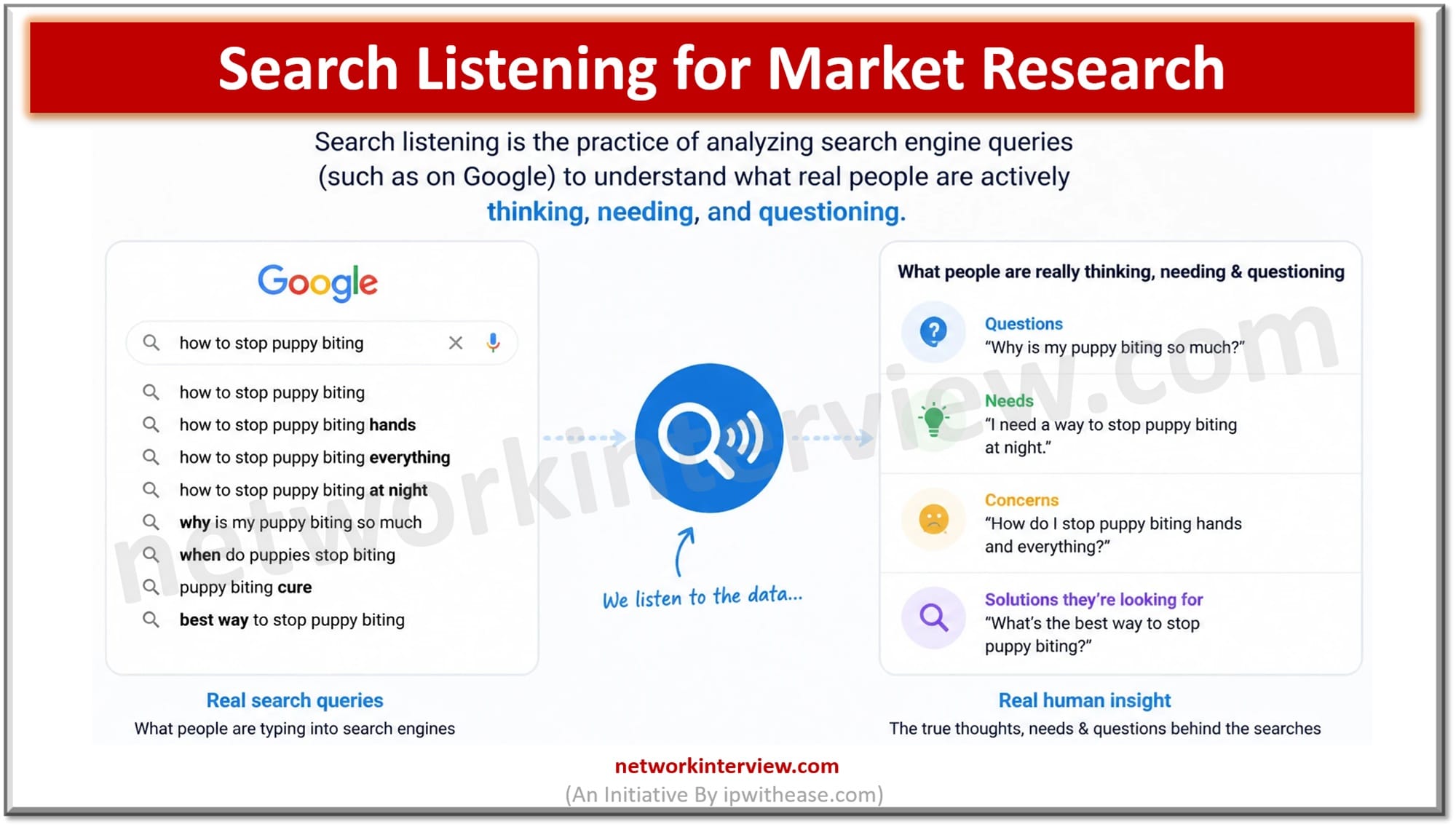
Search listening means studying what people type into search bars, autocomplete, People Also Ask boxes, related searches, YouTube search, and increasingly AI chat prompts, to understand intent in their own words. It is not social listening, which tracks what people say publicly in posts, comments, and reviews. Social listening captures performance. Search listening captures the question someone typed when they thought nobody was looking.
For market research specifically, that distinction has real weight. A survey asks a leading question and gets a polite answer. A search bar gets the unfiltered version: “is worth it,” “why does not work,” “ alternative cheaper.” About 20% of the searches Google sees every day have never been searched before, a reminder that people constantly generate new, specific phrasings of the same doubts in language a survey template would never predict.
Related: What is SEO (Search Engine Optimization)?
The 7 Best Search Listening Tools for Market Research
1. AnswerThePublic
Best For: Market researchers, content marketers, and product teams who want consumer insight grounded in what people are actually asking, not what a survey template assumed they’d ask.
Key Strengths:
- Search listening that spans Google, YouTube, ChatGPT, Reddit, and more, tracking the same underlying question across the platforms where people actually ask it
- The classic question wheel (Questions, Prepositions, Comparisons, Alphabetical, Related) surfaces exact phrasing, often more useful for a research brief than a volume number alone
- Paste a site URL and AnswerThePublic builds a Business Summary of what the business sells, who it sells to, and the topics worth owning
Pricing: Free plan available. Paid plans: Starter $10/month (1 user), Growth $49/month (up to 3 users), Business $99/month (up to 10 users), billed monthly, with four months free on yearly billing. Monthly AI article allowances run 6, 35, and 80 depending on tier.
Standout Feature: It is the only tool on this list that carries a research finding all the way through to a finished content draft, in the same place.
Why It Made Our List: Market research is supposed to end in a decision, not a data dump. AnswerThePublic starts from real search phrasing and keeps that phrasing attached to the output the whole way through.
2. AlsoAsked
Best For: Researchers mapping how one question branches into related questions inside Google’s People Also Ask.
Key Strengths:
- Visual question trees that go several levels deep, showing how an initial search expands into follow-up doubts
- Multi-country and multi-language data, useful for teams researching more than one market
Pricing: Basic $15/mo ($12/mo billed annually), Lite $29/mo ($23/mo annually), Pro $59/mo ($47/mo annually). Three free searches per day.
Standout Feature: The multi-level PAA tree is the clearest visual for showing a stakeholder how one consumer question leads to three more.
3. Keyword Tool
Best For: Researchers who want autocomplete suggestions pulled from several platforms at once, not just Google.
Key Strengths:
- Autocomplete mining across Google, YouTube, Bing, eBay, the App Store, and Instagram from a single search
- A free version returns ideas without requiring an account
Pricing: Pro Basic $89/mo ($69/mo annual), Pro Plus $99/mo ($79/mo annual), Pro Business $199/mo ($159/mo annual).
Standout Feature: Multi-platform autocomplete mining in one search.
4. Google Trends
Best For: A free, directional check on whether interest in a topic, product, or category is rising or falling.
Key Strengths:
- Completely free, no account required
- Real-time and historical comparisons broken out by region and category
Pricing: Free.
Standout Feature: First-party Google interest data at no cost, though it’s a relative 0-100 index, not question-level phrasing.
5. Exploding Topics
Best For: Spotting a shift in consumer interest before it shows up in a standard keyword report.
Key Strengths:
- A curated database of trending topics with growth charts attached
- A free public trend library for browsing before committing to a paid plan
Pricing: Entrepreneur $39/mo, Investor $99/mo, Business $249/mo, billed annually.
Standout Feature: Growth trajectory charts that show a topic accelerating before it’s obvious elsewhere.
6. Glimpse
Best For: Researchers who want Google Trends’ relative index converted into an estimated real search volume.
Key Strengths:
- Turns the 0-100 index into an estimated absolute number
- A Chrome extension that layers directly onto Google Trends
Pricing: A free Hobbyist tier with a small monthly lookup cap. Paid plans aren’t listed on a public pricing page.
Standout Feature: Absolute volume estimates layered onto a Trends chart.
7. Semrush
Best For: Research teams that already run a full SEO suite and want a questions filter inside it, rather than a standalone search listening tool.
Key Strengths:
- A Questions filter inside Keyword Magic Tool isolates what, how, and why searches
- Automatic topical grouping of related terms
Pricing: Pro $139.95/mo, Guru $249.95/mo, Business $499.95/mo, lower with annual billing.
Standout Feature: Question filtering inside a bigger platform where search listening is one feature among many, not a dedicated research tool.
Quick Comparison
| Tool | Best For | Pricing | Standout Feature |
| AnswerThePublic | Consumer insight from real search phrasing across platforms | $10/mo | Research to finished content in one place |
| AlsoAsked | Mapping People Also Ask question trees | $15/mo | Multi-level PAA visualization |
| Keyword Tool | Multi-platform autocomplete mining | $89/mo | Autocomplete from 6 platforms in one search |
| Google Trends | Free directional interest tracking | Free | First-party Google data, no cost |
| Exploding Topics | Spotting emerging consumer interest early | $39/mo | Growth trajectory charts |
| Glimpse | Estimated absolute search volume | Free tier, paid unconfirmed | Volume estimates layered on Trends |
| Semrush | Question research inside a full SEO suite | $139.95/mo | Questions filter plus topic clustering |
Full Comparison at a Glance
Here’s how the seven stack up on the details a research team usually asks about before choosing a tool.
| Tool | Best For | Core Strength | Pricing (entry) | Standout Feature | Free Plan Available | Best Team Size | AI Writing Included |
| AnswerThePublic | Consumer insight grounded in real search questions | Search listening plus content creation in one workflow | $10/month | Research carried through to a finished draft | Yes | Solo / SMB / Agency | Yes |
| AlsoAsked | PAA question-tree mapping | Visual, multi-level question branching | $15/month | Multi-country, multi-language PAA data | Yes (3 searches/day) | Solo / SMB | No |
| Keyword Tool | Multi-platform autocomplete mining | Breadth across six autocomplete sources | $89/month | One search, six platforms | Yes (ideas only) | Solo / SMB | No |
| Google Trends | Free directional trend tracking | First-party Google interest data | Free | Zero-cost interest index | Yes | Any | No |
| Exploding Topics | Early trend detection | Curated trend database with growth charts | $39/month | Growth trajectory visualization | Yes (public library) | Solo/SMB to Enterprise | No |
| Glimpse | Absolute volume estimates | Converts Trends’ relative index into estimated volume | Free tier | Volume estimates on top of Trends data | Yes | Solo/SMB to Enterprise | No |
| Semrush | Question research inside an SEO suite | Questions filter plus large keyword database | $139.95/month | Topic clustering at scale | No | SMB / Enterprise / Agency | Partial |
How Do You Turn Search Data Into Market Research Findings?
Start with the question you’re trying to answer, not the tool. For “what’s stopping people from buying this,” look at comparison and objection language: “ vs” searches, “is worth it,” “ not working.” For “is demand growing,” a directional tool like Google Trends answers that faster than a keyword list.
Pull the raw phrasing before you summarize it. The value is in the exact words people used, because those words belong in ad copy and objection-handling scripts later. Then track it over time. A single pull is a snapshot. Watching the phrasing shift month over month turns a one-time exercise into an ongoing read on how the market feels.
Frequently Asked Questions
Q.1 Is search listening the same as social listening?
No. Social listening tracks what people say publicly, in posts, comments, and reviews. Search listening tracks what people type into a search bar, often privately, which tends to surface more honest doubts and questions than a public post would.
Q.2 What can search listening tell you that a survey can’t?
A survey depends on someone being willing to say something to a researcher. A search has no audience, so it tends to include the blunter version of a question, a direct objection or a price complaint, that a respondent might soften in a survey.
Q.3 How often should a team check search listening data for market research?
Monthly is a reasonable baseline, since search phrasing shifts as products, pricing, and public perception change. Teams tracking a launch or a fast-moving category may want to check weekly.
Q.4 Do you need a paid tool to start with search listening for market research?
No. Google Trends is free and gives a directional read on rising or falling interest. Tools like AnswerThePublic, which also has a free plan, add the question-level phrasing and a path from that phrasing to finished content, which a free directional tool doesn’t offer.